Overview
ALERTWest's backend architecture revolves around the idea of event-driven architectures. From a developer's point of view, this operates similar to webhooks linking multiple services together, but instead of direct API calls payloads are mediated over an Event Bus.
Getting Started with AsyncAPI
AsyncAPI, formally defined here, is a specification for how to document Event Driven Architectures, or EDAs. In AsyncAPI, the fundamental block of the documentation is the service, with a definition of messages the service is consuming and publishing. However, this definition is written from the perspective of a 3rd party service, not the service itself, and as such messages that the documented service will consume is called a publish event (that is, to send a message to our service, a 3rd party service would need to publish that message). Likewise, messages that the service is producing are called subscribe events, as a 3rd party service would need to subscribe to the message our service is producing.
Templating
Since we are using EventBridge, some basic templates are provided in templates as an easy way to get started writing a new message. These include all the EventBridge required formatting and metadata/data fields already created, and all that's needed to do is define the fields as necessary.
Matching Events
Const field types are used to define which fields a 3rd party service should use to consume events. While each service may have it's own set of const fields, the most common are
- #/components/schemas/eventBridgePayload/properties/source - The producing service's codename
- #/components/schemas/eventBridgePayload/properties/eventbusname - The event bus in use
- #/components/schemas/alertwestEventPayload/properties/detail/metadata/type - The payload type. Valid types are enum'd in documentation.
- #/components/schemas/alertwestEventPayload/properties/detail/metadata/version - The payload version. Major versions are used for breaking changes (ie, removing or renaming a field), while minor versions are used for non-breaking changes (ie, adding a field).
These fields are typically going to be defined in the service-specific schemas, so the paths may be different, but they are defined as required fields at the lowest level they are available at.
Matching Version
While most of the other fields are pretty easy to write eventbridge rules for, version can be a little tricky. The easiest way to match versions is to use an EventBridge prefix rule. For example, if your service is looking for specific fields, it's easiest to just match the major version with a rule along the lines of this:
{
  "detail": {
    "metadata": {
      "version": [{ "prefix": "1" }]
    }
  }
}
If your service requires a certain number of fields, such as looping through all the keys, it's easiest to just add the minor version number to the version like this:
{
  "detail": {
    "metadata": {
      "version": [{ "prefix": "1.0" }]
    }
  }
}
You can also specify multiple versions or minor versions like this:
{
  "detail": {
    "metadata": {
      "version": [
        {
          "prefix": "1"
        },
        {
          "prefix": "2.0"
        },
        {
          "prefix": "2.1"
        }
      ]
    }
  }
}
Interactions between services are governed by contracts, where a service guarantees a particular output format. Services utilize a standardized, version-controlled and published event format to ensure that downstream services can reliably consume data from services. As a developer, you only need to worry about the formatting of events your service is producing, while consuming messages the same way you would expect an API to behave.
Data/Metadata Payload
The detail field of an event are split into two fields: data and metadata. Metadata field names are used for EventBridge rule matching, and are therefore static for a particular service. Data fields house the actual data being produced by a service and are generally what is going to be used for actual processing. Global mandatory metadata fields are as follows:
{
  "metadata": {
    "id": "string",
    "type": "string",
    "majorVersion": int,
    "minorVersion": int
  }
}
id [REQUIRED]
A 21-character nanoID string
type [REQUIRED]
The event type. More detail is below in Object Types.
version [REQUIRED]
The service-specific version of the event payload. Major versions are incremented when an event payload has a breaking change that will impact downstream services (ie, renaming or removing a field). Minor versions are incremented when an event payload has a non-breaking change that will not impact downstream services (ie, adding a new field).
Object Types
Object types are the major types used throughout the system that are included in an event’s metadata. Currently, valid object types are as follows:
- Image
- FixedImage
- Pano
- Hit
- Filter
- Incident Each object type has it’s own unique ID scheme that are entirely independent of other types.
Image
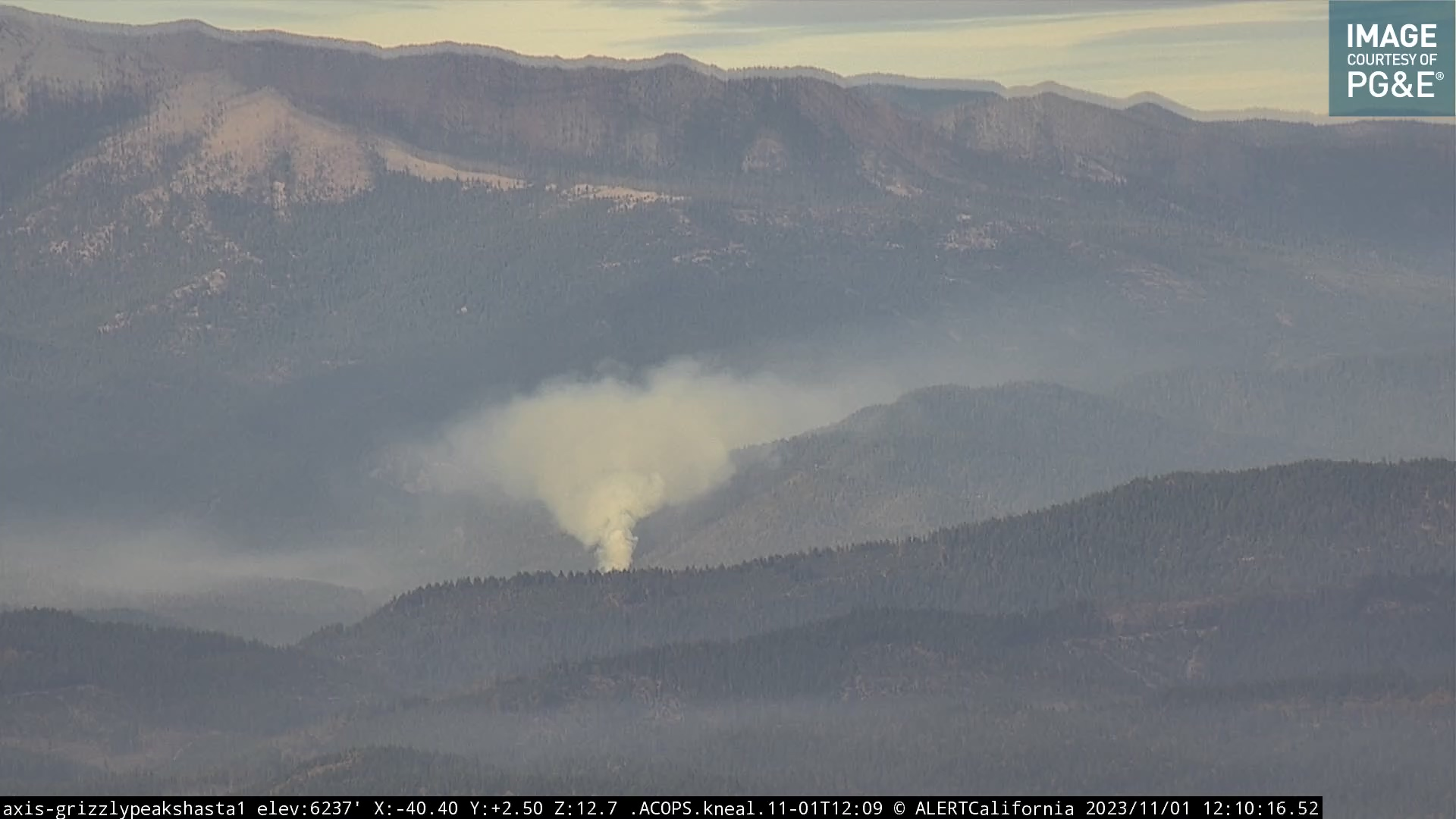
FixedImage
FixedImage events are images from third party non-PTZ cameras, typically with limited metadata available.
Image object types are standard aspect ratio raw images.
Pano

Panos are pre-joined images designed to be accessed all at once. Generally panos are going to be 11520x1080 and work out to around 380 degrees on PTZ cameras.
Hit

Hits are objects created from the Computer Vision models. A single hit object corresponds to a single bounding box detection. In the above image, two hit objects are shown. The actual object is not the image itself, but rather is the attributes associated with the bounding boxes shown.
Filter
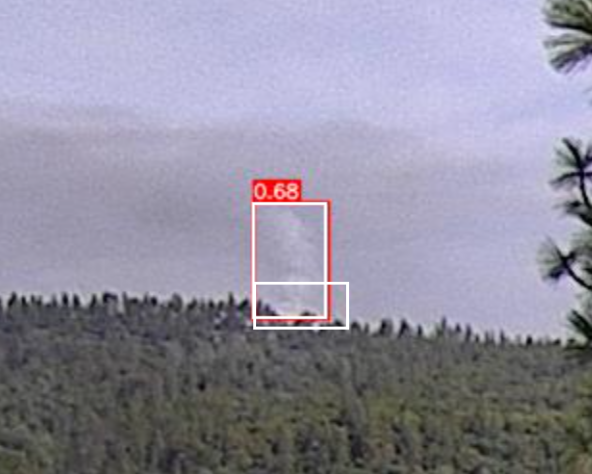
Filter objects are utilized to group multiple Hits together. Similar to a bounding box, filters match bounding box positions and automatically link a string of hits together so the sequence is only reviewed a single time. In the above image, a hit (red box with white overlay) is shown with a filter (white box). Like a hit, a filter is not actually a part of the image, and is just overlaid for visualization.
Incident
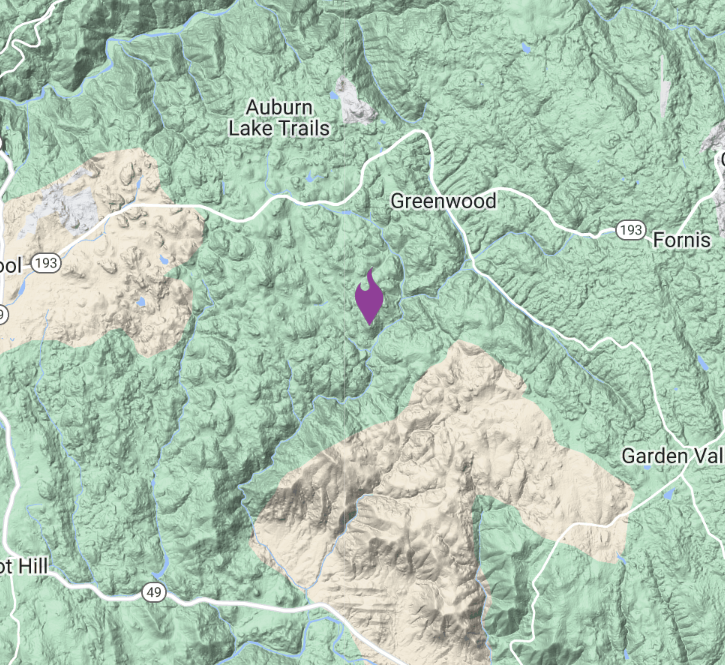
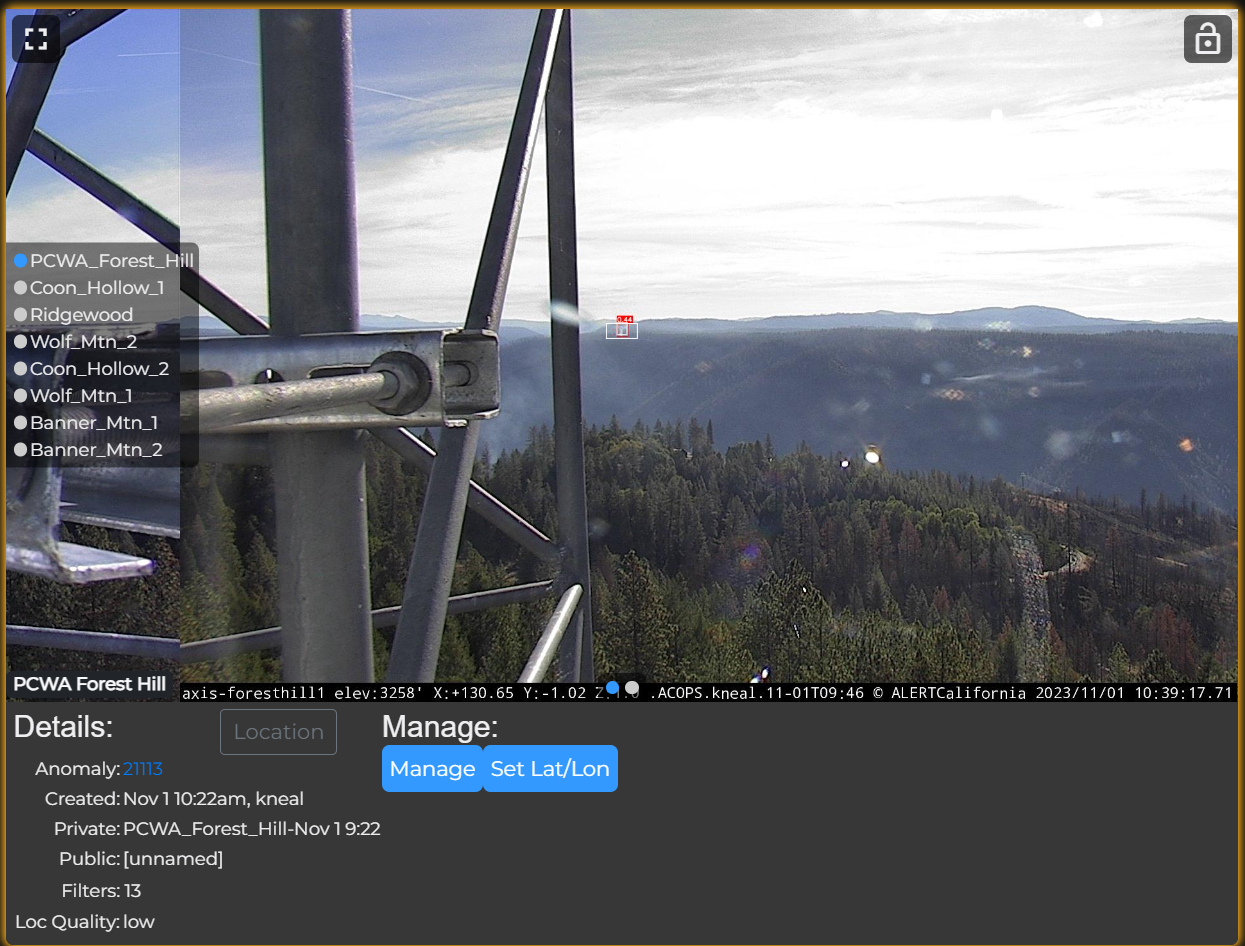
Incident objects are comprised of multiple filters (and therefore, multiple hits from multiple cameras). They are tied to a GPS location, and provide an aggregation of all image data being processed.
General Formatting Rules
In EventBridge, there are a few different fields that can be used when publishing events. They are very broadly defined on the AWS side, which means that there is lots of flexibility when using them, and therefore standardization needs to be defined outside the service. These fields are as follows:
{
  "Time": datetime,
  "Source": "string",
  "Resources": [
    "string",
  ],
  "DetailType": "string",
  "Detail": {
    "Data": json,
    "Metadata": json
  },
  "EventBusName": "string",
  "TraceHeader": "string"
}
Time [OPTIONAL]
Generally, time should be the RFC3339 datetime that the event is being published at. If left blank, AWS SDKs will generally fill it in for you.
Source [OPTIONAL]
The source should be the unique service name of the service producing the event. For example, the YOLO computer vision service might use YOLO as it’s source. Service names are allocated to teams on a first-come first-served basis and can be reflective of project codenames.
DetailType [REQUIRED]
Detail Type is designed to be used to describe the data contained within Detail. Since we are including this information in the Detail Metadata fields, this field will go unused for actual data processing. With this in mind, generally a human-readable description of the service/data should go here.
Detail [REQUIRED]
Detail should contain our Data and Metadata payload, as discussed above. Eventbridge expects this to be a string (json.dumps it), but the fields inside said string can still be used for Rules.
EventBusName [REQUIRED]
The name of the Event Bus. Should be hardset in code (or via environment variables).
TraceHeader [OPTIONAL]
An AWS X-Ray trace header. Don’t use it unless you know what you’re doing and why.